Saturday, October 24, 2015

Favorite Sayings


Here are some of my favorite sayings.  I've collected them over the years and try to live by them, although it's not always easy!

Complexity by Tolstoy

I know that most men, including those at ease with problems of the greatest complexity, can seldom accept even the simplest and most obvious truth if it be such as would oblige them to admit the falsity of conclusions which they have delighted in explaining to colleagues, which they have proudly taught to others, and which they have woven, thread by thread, into the fabric of their lives
Tolstoy

Modern Interpretation

Don't get so comfortable with one technology that you refuse to learn a new one!


***************************

If you work for a man


If you work for a man, then by all means, work for him. If he pays you wages which supply your bread and butter, speak well of him; stand by him and the institution he represents. If put to a pinch, an ounce of loyalty is worth a pound of cleverness.

If you must vilify, condemn and eternally disparage – resign your position, and when you are outside, damn to your hearts content.

But as long as you are part of the institution, do not condemn it. IF you do that , you are loosening the tendrils that are holding you to the institution, and by the first high wind that comes along, you will be uprooted and blown away, and probably will never know why.

Elbert Hubbard


***************************

How to tell the winners from the losers


  • Winners know that people will be good if you give them a chance.
  • Losers feel that people will be bad if you give them the chance.

  • Winners aren't afraid of losing
  • Losers are secretly afraid of winning.

  • Winners work harder than losers and have more time.
  • Loser are always "Too Busy" to what is necessary.

  • Winners take big problems and separate them into smaller parts that can be handled easily.
  • Losers take a lot of little problems and throw them together until they are unmanageable.

  • Winners aren't afraid to contradict themselves when circumstances change.
  • Losers are more concerned with being consistent than being right.

  • When winners make mistakes, they say "I was wrong".
  • When losers make mistakes, they say "It wasn't my fault".

  • Winners make commitments.
  • Losers make promises.

  • Winners say "I'm good, but not as good as I want to be".
  • Losers say "I'm not as bad as a lot of people".

  • Winners listen.
  • Losers just wait for a turn to speak.

  • Winners are sensitive to the atmosphere around them.
  • Losers are sensitive only to their own feelings.

  • Winners respect those who are superior and try to learn from them.
  • Losers resent those who are superior and try to obstruct them.

  • Winners say "There ought to be a better way".
  • Losers say "That's the way it's always been done here".


***************************

The Retired Engineer


There was an engineer who had an exceptional gift for fixing all things mechanical. After serving his company loyally for over 30 years, he happily retired.

Several years later his company contacted him regarding a seemingly impossible problem they were having with one of their multi-million dollar machines. They had tried everything to get the machine fixed but to no avail.

In desperation, they called on the retired engineer who had solved so many of their problems in the past. The engineer reluctantly took the challenge. He spent a day studying the huge machine. At the end of the day he marked a small x in chalk on a particular component of the machine and proudly stated, “This is where your problem is”. The part was replaced and the machine worked perfectly again.

The company received a bill for $50,000 from the engineer for his service. They demanded an itemized accounting of his charges. The engineer responded briefly:

One chalk mark …………......... $1.00
Knowing where to put it ……… $49,999.00

It was paid in full and the engineer retired in peace.


***************************

A Lion in Africa


Every morning in Africa a gazelle wakes up. It knows that it must run faster that the fastest lion or it will be killed.

Every morning a lion wakes up. It knows that it must outrun the slowest gazelle or it will starve to death.

It doesn’t matter whether you are a lion or a gazelle: When the sun comes up you had better be running!


***************************

Change your words, change your mindset


I can't make this any better
------ I can always improve.

It's good enough
------ Is this really my best work?

I made a mistake
------ Mistakes help me improve.

This is too hard
------ This may take some time and effort.

*************************** 

Improvise, Adapt and Overcome
United States Marine Corps

***************************

Life's Journey

Life should NOT be a journey to the grave with the intention of arriving safely in an attractive and well preserved body, but rather to skid in sideways, chocolate in one hand, body thoroughly used up, totally worn out and screaming " Woo Hoo what a ride!" 

I don't know who wrote this but I like it!

*************************** 

The moment you realize that the cavalry aint coming is the same moment you take control of your life. You will begin to put in the work and forget about luck.

Chris Gardner

***************************

Be Careful with your words. Once they are said, they can only be forgiven not forgotten.

Learning is a GIFT, even when PAIN is the teacher.

I will not gossip or make derogatory comments about my teammates

*************************** 

A person who never made a mistake never tried anything new. 
Albert Einstein 

***************************

A good hockey player plays where the puck is. A great hockey player plays where the puck is going to be. Wayne Gretzky 

***************************

“Talent hits a target no one else can hit. Genius hits a target no one else can see.” – Arthur Schopenhauer

***************************

Watch your thoughts, for they become words 
Watch your words, for they become actions 
Watch your actions, for they become habits 
Watch your habits, for they become character 
Watch your character, for it becomes your destiny


Wednesday, September 2, 2015

Layer 2 Traceroute on Cisco Switches

If you are reading this blog you know how to use the standard layer 3 traceroute command to determine the path a packet takes to its destination. But what if you need to determine the path a packet takes at layer 2?

Why would you want to know the layer 2 path when you can find the layer 3 path? On your LAN you won't see a hop across layer 2 switches because they are on the same broadcast domain so a traceroute just shows the IP of the end point.

Requirements

  • Since we are doing a trace at layer 2 the source and destination MACs have to be on the same Vlan. It doesn't make sense to do a layer 2 traceroute if you have to cross a router. 
  • The source and destination MACs have to be unicast MACs, not Multicast.
  • The source and destination MACs cannot be on multiple Vlans.

Example 1

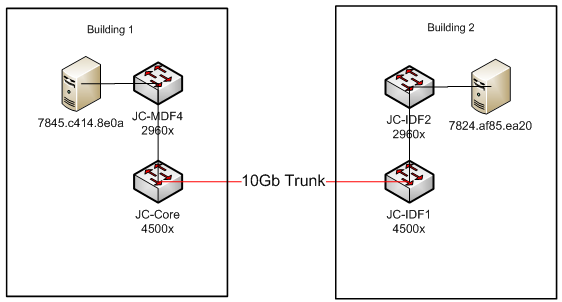
What if you have redundant layer two links and you want to verify that the packets are taking the best path? In the next example we had just installed 10Gb capable 4500x switches and new fiber. The 1Gb link was still in place (it's not shown in the diagram) and I wanted to show the customer that the packets were taking the 10Gb link.


I ran the trace from the 2960x in building 2 using the MAC of the server as the source. The destination was the server in building 1 connected to the 2960x. I included the det(ail) parameter so that it printed out the switch type.


The packet clearly took the new 10Gb link.

A Trace Failure

In the next example the trace failed! The failure message was pretty cryptic -
Multiple devices connected to destination port
Layer2 trace aborted

What does that mean you ask. So did I and luckily the Cisco document in the references had a good explanation:
The Layer 2 traceroute feature is not supported when multiple devices are attached to one port through hubs (for example, multiple CDP neighbors are detected on a port). When more than one CDP neighbor is detected on a port, the Layer 2 path is not identified, and an error message appears.
In this case there were a couple Cisco SF200 switches connected to port 24 of a 2960x in the MDF. I hadn't done a "Sh cdp ne" since connecting the 2960x to the customer's existing network and didn't know they were there.


JC-MDF-3#sh cdp  ne
Capability Codes: R - Router, T - Trans Bridge, B - Source Route Bridge
                  S - Switch, H - Host, I - IGMP, r - Repeater, P - Phone,
                  D - Remote, C - CVTA, M - Two-port Mac Relay

Device ID        Local Intrfce     Holdtme    Capability  Platform  Port ID
08cc68420210     Gig 1/0/24        154              S I   SF 302-08 gi1
roof                 Gig 1/0/24        104               R    MikroTik  Management
ece1a9c5d35e     Gig 1/0/24        126              S I   SF302-08P gi1
JC-Core   Gig 1/0/25        120             R S I  WS-C4500X Ten


References

How to trace MAC address
Cisco IOS Commands - Traceroute MAC
Overview of Layer 2 Switched Networks and Communication

Wednesday, July 22, 2015

Authenticating to Cisco devices using SSH and your RSA Public Key

Using an RSA Public/Private key pair instead of a password to authenticate an SSH session is popular on Linux/Unix boxes. Digital Ocean, a Virtual Private Server (VPS) provider, has this advice on how you should log into their Droplets:  "you should use public key authentication instead of passwords, if at all possible. This is because SSH keys provide a more secure way of logging in compared to using a password alone. While a password can eventually be cracked with a brute-force attack, SSH keys are nearly impossible to decipher by brute force alone." Plus, it means you never have to type C!$c0 again!

Cisco IOS now has support for using SSH with RSA keys. There are many resources showing how to configure SSH with RSA keys on the Internet and I have included several in the references section to give you more information. In this blog I am going to show how to configure a switch and create the public/private key pair using Puttygen for Windows.

OpenSSH ships with most *nix OS's like Mac OSX and Ubuntu so you don't need a separate program to generate the key pair. There are resources in the reference section on how to create the keys using OpenSSH. As a side note, Microsoft announced that it is going to build OpenSSH support into Powershell so you may be able to log into the next release of Windows server using SSH.

Download Puttygen

Recently there was some malware floating around using the name putty.exe. Make sure that you download putty and puttygen from http://www.chiark.greenend.org.uk/~sgtatham/putty/download.html

The MD5 check sums are at this link - checksums.  On Windows you can use the official MS tool FCIV to check the MD5 sums. You can also use the certutil tool built into windows:
certutil -hashfile <filename> md5

If you prefer a GUI Hashtab is a nice tool that integrates into the right click menu. It's free but does require registration and an email address.

On Linux:
md5sum <filename>

Once you have Puttygen double click to start it up. Enter a description for your key and a passphrase. I recommend storing your passphrase in a password manager so that you don't for get it. Select SSH-2 RSA and enter 2048 for bits. Enter a comment for your key pair and click Generate. You will be asked to move the mouse around to generate some entropy.

Once the key is done you can select it and paste it into the switch. You should also save the public and private keys to a file.


Open Putty and create a session. Click on Auth under the SSH menu. Under Authentication parameters click Browse and select your private key. Click on Session and save your session.


You can also click on Data under Connection and set up an Auto-login username:

Don't forget to save your session. If you always log in using the same settings you can set all of them and then save the session as the default session.

Setup the Cisco Device

I'm using a 3750X-48P-L running IOS Version 15.2(3)E1 for this example.

Configure a time server

While this isn't absolutely necessary it's the first thing I do on any production device.
3750x(config)#ntp server 129.6.15.29 prefer
3750x(config)#clock timezone PST -8 0
3750x(config)#clock summer-time PDT recurring

Configure an IP domain name, create the RSA private key and enable SSH

3750x(config)ip domain-name pu.pri
3750x(config)crypto key generate rsa modulus 2048 exportable
3750x(config)ip ssh version 2

Note the "exportable" parameter. This isn't required but I wanted to point that out that you can make the keys exportable. It's not so important in this case but if you have setup GetVPN on a router you absolutely want to export the keys used for the tunnels. If you don't and the router fails you will have to touch EVERY tunnel once you replace the hardware. If you have exported the keys you just reload them on the new hardware and call it a day.

I have a link to a Cisco TAC podcast on GetVPN and DMVPN in the references that does a great job of explaining how to use RSA key pairs and why you MUST export them. If you don't want to listen to the entire podcast jump to minute 40 or so and listen from there. I highly recommend listening to all the TAC Security podcasts.

View the key

3750x#sh crypto key mypubkey rsa
% Key pair was generated at: 22:53:25 PDT Jul 16 2015
Key name: 3750x.pu.pri
Key type: RSA KEYS
 Storage Device: not specified
 Usage: General Purpose Key
 Key is exportable. Redundancy enabled.
 Key Data:
  30820122 300D0609 2A864886 F70D0101 01050003 82010F00 3082010A 02820101
  00ABDBCC B2C31B8F 264A92D0 8C56D9F2 B5B2E8E3 354BDA0E A3C6F287 5D5A66D4
  5BDF9E25 A866E5CA 3B6641CB 375410E9 4F142169 8334C1DC 88F8BC34 80129A62
  F59E0B90 B329A728 93F96C32 EE2AF78A DFF692A0 1649D911 F8DA728B 108B2790
  4954B60D 62999C52 2F832900 61A654A3 938EF6FB EB85F88F 2A3740D6 BE57B4C8
  C55EE8A0 4F6A23AB 416CB6F3 9F211B2E 2640ED4E 7AB03B6F 4B982F91 4965B834
  DB00254F F00E5D4D D3C102AA 75A78903 862D22AF 290D85B2 09D1D8A6 4A5D66C4
  4B7A2E0F 437A4566 864130ED 82411160 4198AFC1 AC0C8946 2FE181A5 6AFBD4AF
  20E8D5A5 83BA182F A5FA8352 48E55CF5 1A5C2F38 B61A57A1 DC7229F8 994C87B2
  C5020301 0001

Export the key

3750x(config)#crypto key export rsa 3750x.pu.pri pem terminal 3des SecurePassPhrase
% Key name: 3750x.pu.pri
   Usage: General Purpose Key
   Key data:
-----BEGIN PUBLIC KEY-----
MIIBIjANBgkqhkiG9w0BAQEFAAOCAQ8AMIIBCgKCAQEAq9vMssMbjyZKktCMVtny
tbLo4zVL2g6jxvKHXVpm1FvfniWoZuXKO2ZByzdUEOlPFCFpgzTB3Ij4vDSAEppi
9Z4LkLMppyiT+Wwy7ir3it/2kqAWSdkR+NpyixCLJ5BJVLYNYpmcUi+DKQBhplSj
k472++uF+I8qN0DWvle0yMVe6KBPaiOrQWy2858hGy4mQO1OerA7b0uYL5FJZbg0
2wAlT/AOXU3TwQKqdaeJA4YtIq8pDYWyCdHYpkpdZsRLei4PQ3pFZoZBMO2CQRFg
QZivwawMiUYv4YGlavvUryDo1aWDuhgvpfqDUkjlXPUaXC84thpXodxyKfiZTIey
xQIDAQAB
-----END PUBLIC KEY-----
-----BEGIN RSA PRIVATE KEY-----
Proc-Type: 4,ENCRYPTED
DEK-Info: DES-EDE3-CBC,3E0EAC17DCDE45B0

Hq3gxGpuI8eE1WvPPr3Xw8bcrzV+cCHvGLu6D3atp5O89sQIQUMxI/udppUMWnbI
7iIpuFIJfTM9WfkNBvBBDVR4jjZfm8sHVqNll2flwqhwnPITaRBgJreaUaHL4xlU
xmPEkApfu7odjZS6sn93tZ1W1+Smn5XzAoBhKNi2N0oDjR0ruubUsPBEWcBFuzJQ
k5SKVsYl++DcA7WgFlL14/B6GgQTEoVJ6R9N14cOCJVORIhCYSxZlds4rNMeuX/9
RffhZriB+0OWJvEnxmgoKpshOX7hQVYpbHyPuJ2sDMwxwqv27uQPVp96kUhm33US
lA/7EEHzWnbvJI4TRCWFSLbaUAiPqA9NMalD6lGqpADqtaoPFPCq4pfQdMc1Lfm8
x0C8Yk+YhQDs/NNyem0xj1swKcxnbcisKzqvFdKNy4Oo60sZZD0dzBlQpxNGbQbo
GxqUPkf2nJ9/1cLnrYQ2gE5f3EN9vfBJbNWx4I5D4uNFaM/an2JxCatOwM7qglhh
C2kPofynBgxfedxSRwButo0VFt4wNs7Ijk2o/IlfZDpaxZoisQwz21z3gnKSTuVQ
gwBcfwXLLyP7e4xTmHcHQfpzu2XQjJmHTqYBU2c/fsBXYYmbwfKgp2UeeVgCVfWP
7Cd53PtRc6kycodB6phcHRdnBd2TDame6IP7dHKASbcuHXFmBRAPRG2wpt90BzFC
WRaRAkSvf8b2GAKjoHJF8Pw/eQBgc9JPXY5UkGapRT+fkw1fS99GUXPiI5EYMmws
BYOOMBgY7h+FCHCuuQ/FpZEyRYHBMYbUSZ0Vt4ikQh4L6kdOz5fC04IUXwtDnOh0
Lv9Un8YRS9tL4JzXjTauByhNxj+JEQnUCBXjTEbdJGZ1k8LGygfD8ixwK8StQ3pe
nwCrJwBPP5oORJmZssdTubyldZTy/abgnZMoJ9RgBI2muxL+3EtzvLnrUvaD4SkK
X8InDcEk8WlmI5joMe+wxrgKehWuRddD0iB+CfpE9N90fRGEvS/awHx2RVdh9VFo
b85l5ebRC8FsIckQPp8qc71vcrJ4P2D88FT5VshD4aUhZYWdLDRPLzbMrFOprjqu
sSU/cxL7V6w3954PzlAV0yVyiQ9TnPCSdPPBVLV8oJzXo/6LWWND72Xi9ORbCTIP
GcoSURd8oQwzmEbwuxeAv2JmZyiJCTZWOvDOc0mZCr7NgkbkZPH+wi8aJzsv9gDU
ISLBu4c+MQ5At4wad6fXLHeAOpKTNJ7nlfHgcgCichQv/tC+yZgvMiV3d6aumXri
dZLBThpuXOWNxkYO3tpZfNv1sRCfwTrn7sr/zW8mDvGMSNlwqOLwDGnH2G5HbQFm
G/w70NxwY5jQniOA/FurorBtm1P68uji7i1yHM6jctfElJXKcBWNyKHsLEc8Uk1A
2CdVPt9fXoUAqjcyV8rqyzn91P6E04ilqUp129oABcVAh7A3lr4u76Nt5Na5qDuo
zzP/2yZAi6dKQJOxpyMjQo4zkKPVPDjkJOwJtfIqGsC5glpYbMXGmUPhsYapAyK6
maXbb2L9aVDnZxl8bt0vHSBDpGVBThXX/iQgZaV0eGzSEhgwZF2wOuLTIMTnJX3C
-----END RSA PRIVATE KEY-----

Configure AAA authentication

The aaa new-model command causes the local username and password on the router to be used in the absence of other AAA statements. Once you enter "aaa new-model" you will not be able to enter "login local" on vty line configuration. If you had login local configured it will be removed.

When you create the username be sure to include a secret. I you don't anyone will be able to login with just the username. As always, create a strong secret and use a password manager to store it.

3750x(config)#username cisco privilege 15 secret ^8(nn-!#who
3750x(config)#aaa new-model
3750x(config)#aaa authentication login default local
3750x(config)#aaa authorization exec default local

(Authentication through the line password is not possible with SSH)

Configure the line

3750x(config)#line vty 0 4
3750x(config-line)#transport input ssh
3750x(config-line)#logging sync (prevents console messages from interfering with your inputs)


Add your PUBLIC key to the device.

Open the public key file you created in puttygen. Copy the text between the comments. If you generated a 2048 bit key you will need to paste it into notepad and break it into smaller pieces or you may see "%SSH: Failed to decode the Key Value" when you exit:
3750x(config)#ip ssh pubkey-chain
3750x(conf-ssh-pubkey)#username hubbard
3750x(conf-ssh-pubkey-user)#key-string
3750x(conf-ssh-pubkey-data)#$QAAAQEAkp2EDdpi86+h2aygSIYLt6DvoeFVKYJ1S/Zr
3750x(conf-ssh-pubkey-data)#$ylIDAzWA+G9TolxvWTLzTcUR/+Ykk74mqQbuGTxpteP
3750x(conf-ssh-pubkey-data)#$IStVVjycGYHRSJv9H2C8OQYMcHCR7yM/36TTFRIjLfV
3750x(conf-ssh-pubkey-data)#$PaWM45mr8DI2/sJkwESLWWGJKYiaSxEG6h+gLA5DePj
3750x(conf-ssh-pubkey-data)#$SP4zpktK7KD51NQDy8vx3jVVhkkANGbFfz/uWk2Uhno
3750x(conf-ssh-pubkey-data)#$DQeBxtZbxEGU4tXDZmRbPGVmk8DtFh9LVRCxUTQ==
3750x(conf-ssh-pubkey-data)#exit

3750x#sh run | sec ssh
ip ssh version 2
ip ssh pubkey-chain
  username hubbard
   key-hash ssh-rsa 0C029272CF23E61C4315A0D59E565B76
 transport input telnet ssh
3750x#
3750x#sh run | b 0 4
line vty 0 4
 transport input ssh
line vty 5 15

Note - You can use the HASH instead of the key for the next devices you setup. Instead of using "Key-string" in the ip ssh pubkey-chain statement use "key-hash ssh-rsa 0C029272CF23E61C4315A0D59E565B76".


Login using your SSH Keys!


SSH with key authentication on Cisco IOS devices - A good blog for Windows users
How To Protect SSH with fail2ban on Ubuntu 12.04
Synchronise remote SSH authorised_keys
Configure SSH in IOS - For IOx devices such as ISR819(C819), CGR1120/1240, and IR829/809.


Saturday, July 18, 2015

Basic Authentication on Cisco Network Devices

In this blog I want to go over basic authentication on a Cisco device because I see a lot of questions on authentication on the Cisco Support forums. Here I have cleared the configuration on a 3750-48PS running IOS 12.2.55-SE10. Once the switch rebooted I connected with a console cable and answered No to the wizard. Then I added an IP address to vlan 1.

interface Vlan1
 ip address 192.168.10.50 255.255.255.0
 no ip redirects
end

Here is what a login session looked like:

As you can see you can't log in using telnet because the vty lines aren't configured. This is really a problem if you forget and leave the site. You will have to return and configure the vty lines before you can log in remotely.

Here is the configuration required to use telnet:
Switch(config)#line vty 0 15
Switch(config-line)#password cisco1
Switch(config-line)#login
Switch(config-line)#end

Switch#sh run | b 0 4
line vty 0 4
 password cisco1
 login
line vty 5 15
 password cisco1
 login
!

Here is what a login session looked like:

Notice that you are placed into user mode. Since we didn't create an "enable secret" password we cannot change to enable mode.

To create an enable secret:
Switch(config)#enable secret 9x3kaqq!!
Switch(config)#end

Using login local

Now we will add "login local" to the vty lines.
Switch(config)#line vty 0 15
Switch(config-line)#login local
Switch(config-line)#end

Switch#sh run | b 0 4
line vty 0 4
 password cisco1
 login local
line vty 5 15
 password cisco1
 login local
!
end

Once login local is added you must create a local user or you will not be able to login. To create the user:
Switch(config)#username cisco privilege 15 secret 9x3kaqq
Switch(config)#end
Switch#sh run | i username
username cisco privilege 15 secret 5 $1$T6mv$85a/oQ3sWiyxKd/yQ9Sh3/


Here is what a login session looked like:

Notice that you are logged directly to enable mode. 

Now we will add a "aaa new-model" command:
aaa new-model
aaa authentication login default local
aaa authorization exec default local
end

Switch#
!Note that login local is removed from vty configuration. You cannot use login local
!once you add the aaa new-model command.
Switch#sh run | b 0 4
line vty 0 4
 password cisco1
line vty 5 15
 password cisco1
!
Switch#sh run | i aaa
aaa new-model
aaa authentication login default local
aaa authorization exec default local
aaa session-id common


Here is what a login session looked like:

Customize the prompts

You can customize the login prompts for username and password. The is helpful if you have a mix of devices using local databases and RADIUS or Tacacs. One caution though, be careful if you are using Cisco Prime Infrastructure or other tool that logs into the devices. I had a bunch of devices with custom prompts one time using local database authentication. I then tried to add the devices to Prime and it failed on the authentication. It turns out that I had miss-spelled password and Prime was looking for Password in the prompt from the switch.


Switch(config)#aaa authentication password-prompt "Enter Local Password: "
Switch(config)#aaa authentication username-prompt "Enter Local username: "
Switch(config)#end


Conclusions
  • It's easy to forget to set up telnet or SSH correctly and not be able to log in remotely once you deploy the switch so pick an authentication method and add it to your basic configuration script.
  • To use RADIUS or TACACS+ you must create a new-model.
  • Don't use telnet unless your device doesn't support encryption. Once you have a username, enable secret and login local, setting up SSH is easy. 

Here are the steps to enable SSH:

Add a hostname to the device - hostname sw1
Add a domain name - ip domain-name mylab.pri
Create the RSA keys - crypto key generate rsa general-keys modulus 2048 (depending on your IOS version this command my be different. Use the ? to work your way through.
enable SSH - ip ssh ver 2
save the configuration - wr mem

The first time your computer connects to a device with SSH enabled you will be asked to verify the host keys. This is because the RSA keys the device offers to you are not known to your host yet. If you are sure that you entered the IP address correctly accept the keys. If you are on Windows using Putty this is what the message looks like: