Sunday, March 6, 2016

Create a Wireless Access Point stand with Schedule 40 PVC

I was asked to setup some some Access Points for a large gathering. The location was a high school auditorium with no easy way to mount the APs. Luckily I had a weekend before the event.

I stopped by Home Depot and picked up some Schedule 40 PVC pipe, Tees, elbows, a piece of 1 3/8" steel punched flat bar and a box of 1/2" self tapping screws, a couple 1/4" x 2 1/4" Hex Head Cap screws and nuts and some 1/4" washers. I created a decent AP stand for under $20.

The stand is light weight, easy to disassemble for transport and worked great. The customer has used them at several events now and they have worked perfectly. I finally got around to modeling the stand in Solidworks 2010 and have created a Bill of Materials and some drawings saved as PDF files.

Not shown in the BoM or model files are 1x1in. UV Mounting Base Model # HW-4ACB  SKU #296167. These are small pieces of plastic with slots for cable ties. I screwed them into the PCV pipe, put cable ties in a loop and then ran the Ethernet cable through them. They keep the Ethernet cable organized. I have considered drill holes in the elbow near the mounting strap and running the cable internally. I think it would look better but it would make assembly at the site more involved.

Tools Required

Hack saw
Disk sander
Vise
Hand drill with a 1/4" and 3/32" drill bit
Sand paper

If you have access to a band saw so much the better! First cut the pipe into the following:
(1) piece 9" long
(4) pieces 15 3/4" long
(4) pieces 3" long
(2) pieces 48" long

Use the disk sander to square up the edges and the sand paper to smooth out the edges. If you don't have a disc sander you can purchase a PVC cutter for around $15. This will cut the pipe square enough to use as is.

Cut the 1 3/8" steel 5" long and round the corners on the disk sander. If you don't have a disc sander use the sand paper to remove the burrs and use as is. It will still work just fine.

Drill 1/4" holes through the 9" piece of pipe using the SCH40-1-25x9.pdf file for dimensions. The link to the files is at the end of the blog.

Assembly

Assemble the 9" pipe and 1 3/8" steel mount using the AP-Mounting-Assy.pdf as a guide. When complete it will look like this:
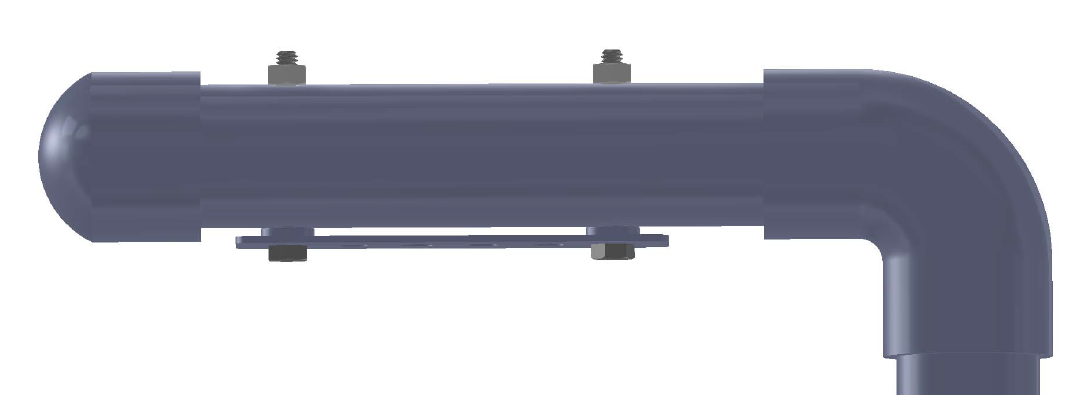

The Cisco AP mount fits perfectly on the 1 3/8" strap and the PVC keeps it from sliding off.

Assembling the base

This step is easier with two people. 
Start with a Tee and insert a 3" piece of pipe into each side. The 48" section will go into the third.
Attach a Tee to each 3" section.
Insert one 15 3/4" piece of pipe into each Tee.
Insert a 3" piece of pipe int each Tee.
Attach a 45 degree fitting to each 3" piece.
Insert one 15 3/4" piece of pipe into each 45 degree fitting.
Place caps onto each 15 3/4" piece of pipe.
Insert a 48" piece of pipe into the vertical Tee.

Place a 20" long 3/4" x 2 1/2" piece of wood under the center Tee. Rotate each 15 3/4" pieces down until the caps are on the floor. You can leave the base flat but this creates a more stable base than leaving the base flat.


Make sure that the 48" pipe is vertical or slightly forward. 
Drill 3/32" holes through each Tee and 3" piece of pipe. 
Screw the #8 self tapping screws into the holes. 
Drill 3/32" holes through each 45 degree fitting and 3" piece of pipe. 
Screw the #8 self tapping screws into the holes. 
Drill 3/32" holes through each 45 degree fitting and 15 3/4" piece of pipe. 
Screw the #8 self tapping screws into the holes. 

Now you just insert the 48" pipe, attach the coupler, insert the 2nd 48" pipe and attach the elbow with the AP mount. To transport simply remove the AP mount, remove the two 48" pipes and the 15 3/4 pipes. 


Here are the Solidworks files, PDF and JPGs of the project. There is a file called ap-stand.wrl in the directory. This is a VRML file. VRML is a format that allows 3d models to be displayed in a browser. You need to install a browser plugin from cortona 3d viewer to view the file.

AP Stand files

Wednesday, February 24, 2016

Cisco 6880-X with 6800IA Instant Access Fabric Extender

I was lucky enough to get a 6880-X-LE switch and 6800IA-FPD to configure this week!  In fact I got 10 of them to deploy to ten middle school sites.

References

Cisco has a lot of documentation for the the 6800IA. Here are the documents I used to configure mine:

Cisco Catalyst Instant Access FAQ
Cisco Catalyst Instant Access Solution White Paper
Instant Access (IA)
So you really want to manually configure the 6800ia? It’s possible

For the VSS configuration I found a great blog on the Ciscozine.com site
Cisco 6500 VSS configuration

What is a Cisco 6880-X?

According to Cisco the Catalyst 6880-X meets the unique needs of a midsize campus, with the ideal combination of:

  •     Advanced services
  •     Optimal port capacity
  •     10 Gigabit Ethernet density
  •     Compelling economics

These switches offer:

  • Five slots (one fixed and four extensible half-wide slots) on less than a 5-rack-unit (RU) form factor chassis
  • Support for up to eighty 10/1 Gigabit Ethernet or twenty 40 Gigabit Ethernet ports, and readiness for 100 Gigabit Ethernet
  • Full feature consistency with Cisco Catalyst 6500 Series Switches

Prerequisites

To use the 6800IA Instant Access FEX  you must be running at least IOS Software 15.1(2). I chose 15.1(2)SY6 since it's an MD release. The FEX connects to the 6880-x using 10Gbe links and both fiber and copper options are supported. For this deployment I am using 2m Twinax cables. 

The 6800IA FAQ says the following about cabling:
The Cisco Catalyst 6800ia has two 10 Gigabit Ethernet SFP+ uplink ports. The ports support Short-Reach (SR), Long-Reach (LR), Long-Reach Multimode (LRM), and Extended-Reach (ER) Small Form-Factor Pluggable Plus (SFP+) fiber transceivers and associated MMF or SMF fiber cables. They also support 1M, 3M, and 5M copper Twinax cables.

So if you need to place your 48 port FEX 10Km from  your data center Cisco has you covered! 

Preparing the 6880-X

The Parent as Cisco calls it must be put into Virtual Switching System (VSS) mode before it can be connected to the 6800IA. Even if you only have one 6880 you still have to put it into VSS mode. 

Here are the steps to put the 6880-X into VSS Mode:

(config)switch virtual domain 100
(config-vs-domain)#switch 1
Domain ID 100 config will take effect only
after the exec command 'switch convert mode virtual' is issued
exit

#switch convert mode virtual
This command will convert all interface names
to naming convention "interface-type switch-number/slot/port",
save the running config to startup-config and 
reload the switch.

NOTE: Make sure to configure one or more dual-active detection methods
once the conversion is complete and the switches have come up in VSS mode.

Do you want to proceed? [yes/no]: yes

The switch will reload at this point. 

When it restarts the Ten Gig ports will be renamed in the format T1/5/1.

Now that the switch is in VSS mode we can configure it for the 6800IA. FEX IDs can must be in the range of 101-199. In this example I am using 101.

#module provision create fex 101 type c6800IA-48FPD

Instant Access staggered initialization mode avoids any excessively high CPU utilization that might occur if multiple IA clients attempt to initialize simultaneously. In my deployment there is only one IA but I configured stagger in case the customer stacked a second IA in future. Cisco's recommended delay is 120.

conf t
fex stagger 120
exit

interface po101
switchport
switchport mode fex-fabric
fex associate 101
no shutdown
exit

interface range tenGigabitEthernet 1/5/15-16
switchport
switchport mode fex-fabric
channel-group 101 mode on
no shut
exit
fex 101
description < My 6800IA-48FPD >
end

Connecting the 6800IA
You can now connect the cables from the 6880 to the 6800IA. Once you do the 6880-X will verify the firmware version on the IA. In my case 15.1(2)SY6 was newer so the 6880-X started the upgrade process automatically. 

Once the upgrade/reload process completed I did a show interface to look at the interfaces on the  IA. In the output below I have configured the first port as an access port on vlan 5 with a voice port. Note the switchport trunk allowed vlan 1 command. That is a default and cannot be removed. It didn't affect operation on an access port. Here is the explanation from the FAQ:

Q. Why is the default configuration of Instant Access client host port configuration “switch trunk allowed vlan 1” and not “all”?

A. Each Instant Access host port can be configured in access or trunk mode (default is dynamic). If in trunk mode, there is a constraint as to how many VLANs can be trunked on each port.

Note: No more than 1,000 VLANs can be associated with a single FEX ID, divided by the number of Instant Access trunk ports. To make sure that this constraint is followed, implementation requires specifying explicitly which VLANs will be trunked. We recommend no more than 20 VLANs per Instant Access trunk port (up to the total of 1000 per FEX), to limit the amount of BPDU processing.

sh run | b 101/1/0/1
interface GigabitEthernet101/1/0/1
 switchport
 switchport access vlan 5
 switchport trunk allowed vlan 1
 switchport mode access
 switchport nonegotiate
 switchport voice vlan 253
 logging event link-status


Show Commands

Cisco provides several show commands for the FEX. Here is "show fex" with a ?:

sh fex 101 ?
  detail       FEX detailed information
  protocol     SDP/SRP protocol details
  transceiver  FEX transceiver information
  version      FEX version
  |            Output modifiers
  <cr>


show fex 101 detail
FEX: 101        Description: < My 6800IA-48FPD >     state: online
  FEX version: 15.0(2)EX9
  Extender Model: C6800IA-48FPD, Extender Serial: FCW196789PK
  FCP ready: yes
  Image Version Check: enforced
  Fabric Portchannel Ports: 2
  Fabric port for control traffic: Te1/5/15
  Fabric interface state:
    Po101      - Interface Up.
    Te1/5/15   - Interface Up.      state: bound
    Te1/5/16   - Interface Up.      state: bound

show fex 101 protocol | incl SDP
    8789 SDP pkts sent
    8785 SDP pkts received
    8768 SDP pkts sent
    8763 SDP pkts received

sh fex 101 transceiver
Module 1:
Fex Uplink: 1
SFP+ transceiver present
 Identifier        : SFP [0x03]
 Connector         : Copper Pigtail [0x21]
 Speed             : Unspecified [0x00]
 Product ID        : SFP-H10GB-CU3M
 Version ID        : V03
 Encoding          : Unspecified [0x00]
 BR, Nominal       : 103x100 MHz [0x67]
 Length(9u)        : Transceiver does not support single mode fibre,
                     or the length information must be determined from
                     the transceiver technology. [0x00]
 Length(50u)       : Transceiver does not support 50 micron multi-mode fibre,
                     or the length information must be determined from
                     the transceiver technology. [0x00]
 Length(62.5u)     : Transceiver does not support 62.5 micron multi-mode fibre,
                     or the length information must be determined from
                     the transceiver technology. [0x00]
 Vendor Name       : CISCO-TYCO
 Vendor OUI        : 0x0 0x40 0x20
 Vendor PN         : 1-2053783-2
 Vendor SN         : TED1726B08N
 Vendor rev        : R
 CC_BASE           : 0xF
 Date code         : 17062600
 CC_EXT            : 0xDB

sh interfaces fex
     Fabric    Fabric Port  FEX                  FEX
FEX  Port      State        Uplink    Model              Serial
---------------------------------------------------------------------
101  Te1/5/15  bound        Te1/0/1   C6800IA-48FPD      FCW196789PK
101  Te1/5/16  bound        Te1/0/2   C6800IA-48FPD      FCW196789PK


Saturday, October 24, 2015

Favorite Sayings


Here are some of my favorite sayings.  I've collected them over the years and try to live by them, although it's not always easy!

Complexity by Tolstoy

I know that most men, including those at ease with problems of the greatest complexity, can seldom accept even the simplest and most obvious truth if it be such as would oblige them to admit the falsity of conclusions which they have delighted in explaining to colleagues, which they have proudly taught to others, and which they have woven, thread by thread, into the fabric of their lives
Tolstoy

Modern Interpretation

Don't get so comfortable with one technology that you refuse to learn a new one!


***************************

If you work for a man


If you work for a man, then by all means, work for him. If he pays you wages which supply your bread and butter, speak well of him; stand by him and the institution he represents. If put to a pinch, an ounce of loyalty is worth a pound of cleverness.

If you must vilify, condemn and eternally disparage – resign your position, and when you are outside, damn to your hearts content.

But as long as you are part of the institution, do not condemn it. IF you do that , you are loosening the tendrils that are holding you to the institution, and by the first high wind that comes along, you will be uprooted and blown away, and probably will never know why.

Elbert Hubbard


***************************

How to tell the winners from the losers


  • Winners know that people will be good if you give them a chance.
  • Losers feel that people will be bad if you give them the chance.

  • Winners aren't afraid of losing
  • Losers are secretly afraid of winning.

  • Winners work harder than losers and have more time.
  • Loser are always "Too Busy" to what is necessary.

  • Winners take big problems and separate them into smaller parts that can be handled easily.
  • Losers take a lot of little problems and throw them together until they are unmanageable.

  • Winners aren't afraid to contradict themselves when circumstances change.
  • Losers are more concerned with being consistent than being right.

  • When winners make mistakes, they say "I was wrong".
  • When losers make mistakes, they say "It wasn't my fault".

  • Winners make commitments.
  • Losers make promises.

  • Winners say "I'm good, but not as good as I want to be".
  • Losers say "I'm not as bad as a lot of people".

  • Winners listen.
  • Losers just wait for a turn to speak.

  • Winners are sensitive to the atmosphere around them.
  • Losers are sensitive only to their own feelings.

  • Winners respect those who are superior and try to learn from them.
  • Losers resent those who are superior and try to obstruct them.

  • Winners say "There ought to be a better way".
  • Losers say "That's the way it's always been done here".


***************************

The Retired Engineer


There was an engineer who had an exceptional gift for fixing all things mechanical. After serving his company loyally for over 30 years, he happily retired.

Several years later his company contacted him regarding a seemingly impossible problem they were having with one of their multi-million dollar machines. They had tried everything to get the machine fixed but to no avail.

In desperation, they called on the retired engineer who had solved so many of their problems in the past. The engineer reluctantly took the challenge. He spent a day studying the huge machine. At the end of the day he marked a small x in chalk on a particular component of the machine and proudly stated, “This is where your problem is”. The part was replaced and the machine worked perfectly again.

The company received a bill for $50,000 from the engineer for his service. They demanded an itemized accounting of his charges. The engineer responded briefly:

One chalk mark …………......... $1.00
Knowing where to put it ……… $49,999.00

It was paid in full and the engineer retired in peace.


***************************

A Lion in Africa


Every morning in Africa a gazelle wakes up. It knows that it must run faster that the fastest lion or it will be killed.

Every morning a lion wakes up. It knows that it must outrun the slowest gazelle or it will starve to death.

It doesn’t matter whether you are a lion or a gazelle: When the sun comes up you had better be running!


***************************

Change your words, change your mindset


I can't make this any better
------ I can always improve.

It's good enough
------ Is this really my best work?

I made a mistake
------ Mistakes help me improve.

This is too hard
------ This may take some time and effort.

*************************** 

Improvise, Adapt and Overcome
United States Marine Corps

***************************

Life's Journey

Life should NOT be a journey to the grave with the intention of arriving safely in an attractive and well preserved body, but rather to skid in sideways, chocolate in one hand, body thoroughly used up, totally worn out and screaming " Woo Hoo what a ride!" 

I don't know who wrote this but I like it!

*************************** 

The moment you realize that the cavalry aint coming is the same moment you take control of your life. You will begin to put in the work and forget about luck.

Chris Gardner

***************************

Be Careful with your words. Once they are said, they can only be forgiven not forgotten.

Learning is a GIFT, even when PAIN is the teacher.

I will not gossip or make derogatory comments about my teammates

*************************** 

A person who never made a mistake never tried anything new. 
Albert Einstein 

***************************

A good hockey player plays where the puck is. A great hockey player plays where the puck is going to be. Wayne Gretzky 

***************************

“Talent hits a target no one else can hit. Genius hits a target no one else can see.” – Arthur Schopenhauer

***************************

Watch your thoughts, for they become words 
Watch your words, for they become actions 
Watch your actions, for they become habits 
Watch your habits, for they become character 
Watch your character, for it becomes your destiny


Wednesday, September 2, 2015

Layer 2 Traceroute on Cisco Switches

If you are reading this blog you know how to use the standard layer 3 traceroute command to determine the path a packet takes to its destination. But what if you need to determine the path a packet takes at layer 2?

Why would you want to know the layer 2 path when you can find the layer 3 path? On your LAN you won't see a hop across layer 2 switches because they are on the same broadcast domain so a traceroute just shows the IP of the end point.

Requirements

  • Since we are doing a trace at layer 2 the source and destination MACs have to be on the same Vlan. It doesn't make sense to do a layer 2 traceroute if you have to cross a router. 
  • The source and destination MACs have to be unicast MACs, not Multicast.
  • The source and destination MACs cannot be on multiple Vlans.

Example 1

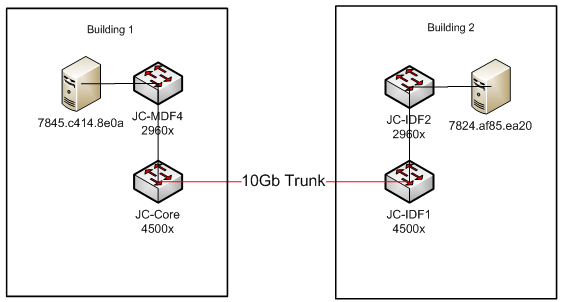
What if you have redundant layer two links and you want to verify that the packets are taking the best path? In the next example we had just installed 10Gb capable 4500x switches and new fiber. The 1Gb link was still in place (it's not shown in the diagram) and I wanted to show the customer that the packets were taking the 10Gb link.


I ran the trace from the 2960x in building 2 using the MAC of the server as the source. The destination was the server in building 1 connected to the 2960x. I included the det(ail) parameter so that it printed out the switch type.


The packet clearly took the new 10Gb link.

A Trace Failure

In the next example the trace failed! The failure message was pretty cryptic -
Multiple devices connected to destination port
Layer2 trace aborted

What does that mean you ask. So did I and luckily the Cisco document in the references had a good explanation:
The Layer 2 traceroute feature is not supported when multiple devices are attached to one port through hubs (for example, multiple CDP neighbors are detected on a port). When more than one CDP neighbor is detected on a port, the Layer 2 path is not identified, and an error message appears.
In this case there were a couple Cisco SF200 switches connected to port 24 of a 2960x in the MDF. I hadn't done a "Sh cdp ne" since connecting the 2960x to the customer's existing network and didn't know they were there.


JC-MDF-3#sh cdp  ne
Capability Codes: R - Router, T - Trans Bridge, B - Source Route Bridge
                  S - Switch, H - Host, I - IGMP, r - Repeater, P - Phone,
                  D - Remote, C - CVTA, M - Two-port Mac Relay

Device ID        Local Intrfce     Holdtme    Capability  Platform  Port ID
08cc68420210     Gig 1/0/24        154              S I   SF 302-08 gi1
roof                 Gig 1/0/24        104               R    MikroTik  Management
ece1a9c5d35e     Gig 1/0/24        126              S I   SF302-08P gi1
JC-Core   Gig 1/0/25        120             R S I  WS-C4500X Ten


References

How to trace MAC address
Cisco IOS Commands - Traceroute MAC
Overview of Layer 2 Switched Networks and Communication